
Can You Sell Packages with Calendly? Yes — Here’s Exactly How They Work
Calfrenzy Team


Checked against calendly.com/pricing and Calendly’s help center on October 2026. Calendly updates its features regularly; confirm on their site before you build your offer around this.
Yes — Calendly sells meeting packages on its paid plans (Standard, $10/seat/month billed annually, and above). You set a number of prepaid sessions and a price, the client pays once through Stripe or PayPal, and Calendly tracks the remaining balance. The client then books each session individually against the package; they can’t select all their session dates at purchase.
That last sentence is the part most people asking this question actually care about, so this guide covers both halves: exactly how Calendly’s packages work — setup, payment, booking, tracking — and precisely where they stop, so you can tell in five minutes whether they fit the way you sell.
How Calendly packages actually work
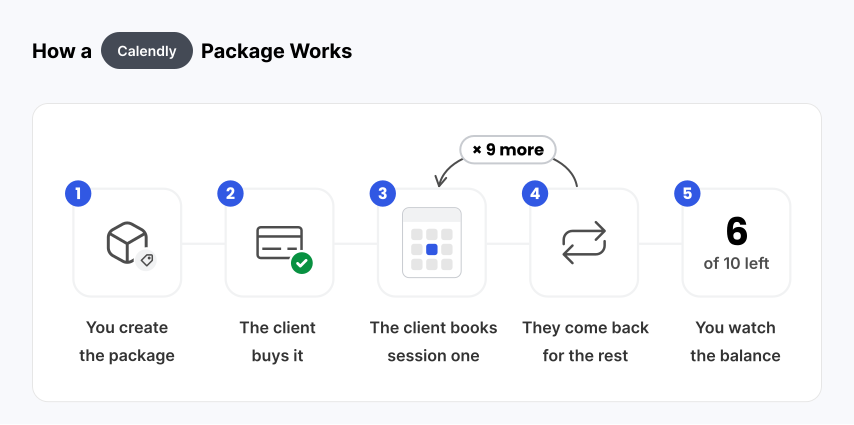
According to Calendly’s pricing page and help documentation, a package lets you sell multiple prepaid sessions together and track them over time. The mechanics, as the client and you experience them:
- You create the package on a paid plan: pick the event type, set how many sessions it contains and the price. Payment collection runs through your connected Stripe or PayPal account.
- The client buys it in one payment. That single transaction is the “package” — a prepaid balance attached to that client.
- The client books session one — one session, one time slot, the normal Calendly flow. The booking draws down the balance.
- They come back for each subsequent session and book it the same way, whenever they’re ready, until the balance reaches zero. Calendly tracks sessions used and sessions remaining.
- You watch the balance from your side — who has sessions left, who’s finished.
Alongside packages, Calendly’s paid plans also offer single-session payment at booking, payment links, and invoicing, so per-session and package selling can live on the same account.
It’s a genuinely useful mechanic, and it fixed the biggest historical complaint about Calendly for service providers — that it could schedule sessions but not sell them in bulk. If your clients like paying up front and booking as they go, it works exactly as described.
A Calendly package sells the money up front; the dates still get booked one at a time later. If your business needs both settled at once — the client picks all ten sessions and pays for the block in a single checkout — that’s a different tool. Calfrenzy does exactly that; the full comparison is at the end of this guide.
What Calendly packages don’t do
Four limits, stated plainly, because they decide whether the feature fits your business:
The client can’t pick their session dates at purchase. The package sale and the scheduling are separate steps. A client who buys ten sessions has bought a balance, not a schedule — the ten Tuesdays they had in mind still have to be booked one at a time, and nothing guarantees those slots will still be open when they come back.
No recurring series inside a package. You can’t sell “every Tuesday at 4pm for ten weeks” as one purchase. Recurring availability is handled through event settings, but it isn’t a bookable, payable block.
Not on the free plan. Packages, like all Calendly payment features, start on Standard. If you’re on Calendly Free, the answer to this article’s title is no until you upgrade.
The balance lives in Calendly’s frame, not yours. The package is a Calendly construct the client interacts with through Calendly’s interface — fine for most, worth knowing if your brand experience matters to you (branding removal is also a paid-plan feature).
None of these are bugs; they follow from what a Calendly package is — a prepaid meeting balance. The question is whether a balance is what you’re selling.
If it’s the first limit that stings — clients should choose all their dates at purchase — that’s exactly what Calfrenzy is built for: every date in the block picked in one cart, paid in one checkout. Start a free 14-day trial, no card required, or keep reading for when Calendly’s version is genuinely the better fit.
Workarounds people try inside Calendly
Before packages existed, service providers bent Calendly into selling blocks; some still do. The three common patterns and where each leaks:
Invoice outside, schedule inside. Sell the block by invoice (or Calendly’s own invoicing), then have the client book sessions against a free event type. Works, but nothing connects money to sessions: you’re manually tracking who has how many left, and the client books “free” slots that you have to police.
One long event. Create a 10-hour “program” event or a weekly recurring hold. The calendar fills, but there’s one payment against one calendar object — reschedule a single session and the bookkeeping is yours.
A form plus a payment link. Collect dates by intake form, take payment by link, enter sessions by hand. This is just doing the software’s job yourself; it works until the first reschedule.
Calendly’s package feature genuinely retires the first workaround — payment and session count now live together. What it doesn’t retire is the reason people used the second: they wanted the dates committed, not just the money.
When Calendly packages are enough — and when they aren’t
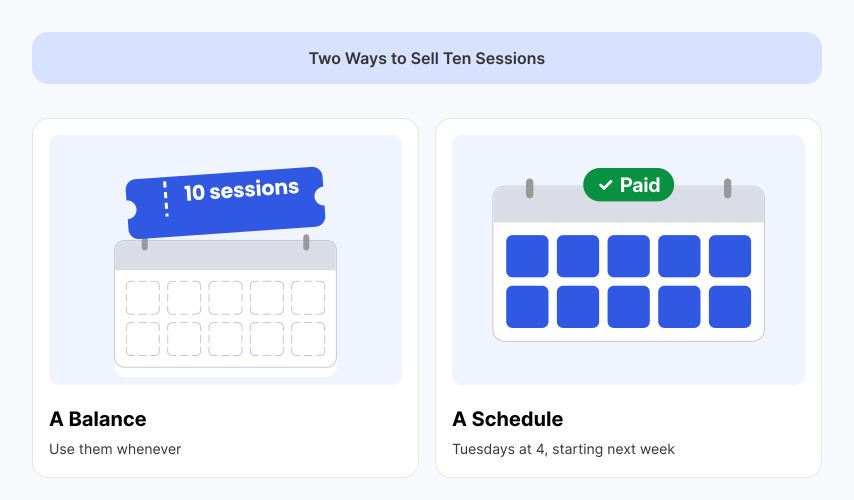
They’re enough when scheduling flexibility is the point. A consultant selling five advisory calls to be used over six months; a mentor whose clients book ad hoc; any offer where “use them whenever” is a feature. Prepaid balance, book as you go — that’s exactly the Calendly model, and if this is you, upgrade to Standard and stop reading.
They’re not enough when the schedule is the product. A term of weekly lessons, a 12-week program, an eight-session training block where consistency drives the outcome. Here the client buying a balance and drifting back “when they’re ready” is the failure mode the package was supposed to prevent — the money is committed but the habit isn’t. What you want committed at checkout is the calendar.
One test: when a client says yes, do you know what dates they’ll come? If the honest answer is “whenever they book,” Calendly packages fit. If the answer is “Tuesdays at 4, starting next week,” you’re selling fixed dates, and a prepaid balance is the wrong container.
If you’re selling fixed dates, there’s a tool built for that
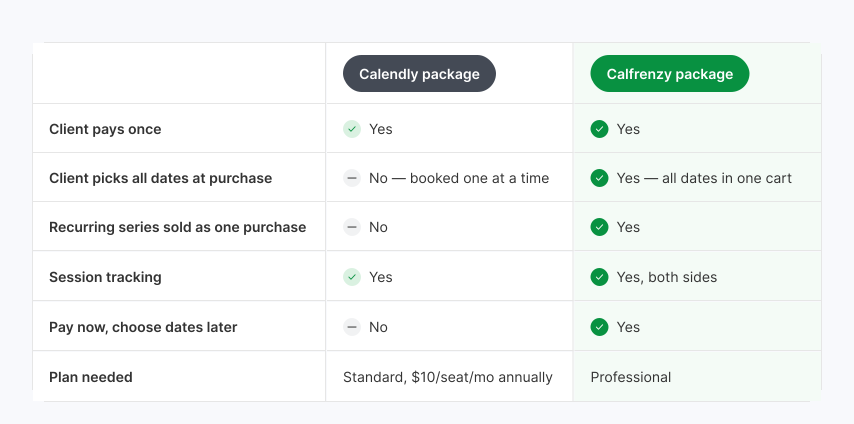
Calendly column from calendly.com, 29 Sep 2026. Calfrenzy column reflects the Professional plan.
We build Calfrenzy, so weigh this section accordingly. It exists for the second case above: the client picks every date in the block on your booking page and pays for the whole thing in one checkout.
Ten Tuesday lessons chosen and paid in one transaction. An eight-session pack where the client selects their eight slots in the cart. Recurring series and one-off dates mixed in the same purchase. A client who wants to commit before their diary settles can pay now and pick dates later, and both sides see “3 of 10 completed” as the block runs.
Calendly Package | Calfrenzy Package | |
|---|---|---|
Client pays once | Yes | Yes |
Client picks all dates at purchase | No — booked one at a time | Yes — all dates in one cart |
Recurring series sold as one purchase | No | Yes |
Session tracking | Yes | Yes, both sides |
Pay now, choose dates later | No | Yes |
Plan needed | Standard, $10/seat/mo annually | Professional |
Calendly column from calendly.com, 29 Sep 2026; Calfrenzy column reflects the Professional plan.
Where Calendly stays the better pick: meetings-first work, its integrations ecosystem, routing and team scheduling, and every case in the “they’re enough” list above. This isn’t a Calendly alternative pitch — for a lot of the people searching this question, the honest answer is “yes, and Calendly’s version is fine.” It’s for the rest that Calfrenzy exists.
Frequently asked questions
No. Packages, like all Calendly payment features, require a paid plan — Standard at $10 per seat per month billed annually, or above.
One at a time. The client pays for the package up front, then returns to your booking page to schedule each session individually; Calendly deducts each booking from the remaining balance.
No. The purchase and the scheduling are separate steps in Calendly. If you want clients to select every date and pay in one checkout, that’s a different mechanic — see the fixed-dates section above.
Recurring availability is handled through event settings on paid plans, but a recurring series can’t be sold and paid for as a single package purchase.
Stripe and PayPal, on paid plans. The processor’s standard transaction fees apply.
Standard is $10 per seat per month billed annually ($12 monthly) and includes payments, packages, invoicing and payment links. Full breakdown in our Calendly pricing guide.
Let clients pick every date and pay once
Start a free 14-day trial — no credit card required — if fixed dates are what you’re selling.
Create Your Calfrenzy Account
Related Articles

How to Build a Booking Page That Actually Converts
A booking page converts when it answers every question a client has before they reach a wall — then keeps the next step in reach. Lead with your brand, show clear session options, spell out what’s included, add real proof, and keep the booking button visible the whole way down.

How to Sell Coaching Packages Instead of Single Sessions
A client who commits to a block shows up, does the work, and gets a result worth referring. Here’s how to structure a package, frame its value, and — the part most guides skip — let clients book and pay for the whole thing in one checkout.

Recurring Lesson Scheduling: How to Book a Full Term at Once
Book a repeating series of lessons — every Tuesday at 4pm for a term — as one series instead of scheduling each lesson individually. How recurring scheduling works, when to use it instead of one-off or multi-session booking, and how to set up a full term without the weekly admin.
Ready to Grow Your Practice?
Set up your booking page in under 2 minutes. Packages, payments, and reminders included.


