
How to Reduce Tutoring No-Shows
Cut tutoring no-shows with clear family policies, dual reminders, payment at booking, packages and easy rescheduling. A tutor-focused guide for 2026.
Olesia


A tutoring no-show is rarely a simple forgotten appointment. A parent booked the lesson, a student was meant to attend, and you still lose an hour you cannot fill.
You cannot stop every miss. You can make the schedule clearer for families, give them an easy way to move a date before your deadline, and decide what happens when someone does not show up.
This guide is for tutors and small academies. It focuses on parents, students, lesson packages and recurring weekly lessons. For choosing and explaining a fee after a miss, see our separate no-show fee guide once it is live.
Why tutoring no-shows are different
In tutoring, the person who books is often not the person who sits in the lesson. A parent manages the calendar, transport and payment. A student manages homework and showing up. Online lessons fail when the wrong person has the join link; in-person lessons fail when pickup or clubs shift without notice.
Your process has to reach the adult who can reschedule and the student who needs to attend. Seven habits do most of the work:
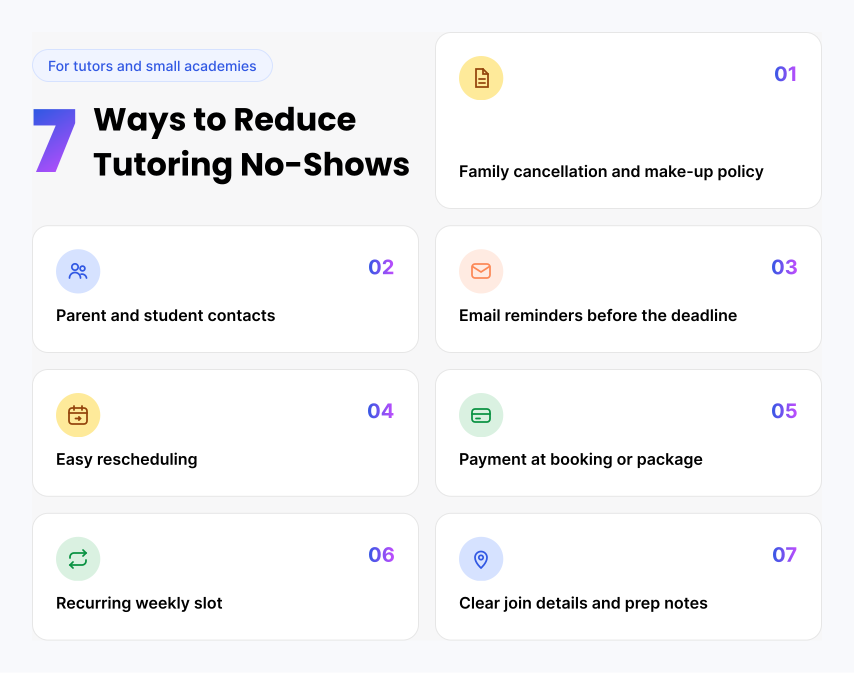
1. Write a family-facing cancellation and make-up policy
Put the rules in writing before the next term starts, and show them on the booking page and in the confirmation email.
Cover four points in plain language:
- Notice window: how many hours ahead a family must cancel or reschedule (24 hours is common for weekly lessons).
- Late cancel vs no-show: whether a message five minutes before counts the same as silence.
- Make-up lessons: how many are allowed, how soon they must be used, and how to request one.
- Packages: whether a late cancel or no-show counts as a used session in a prepaid block.
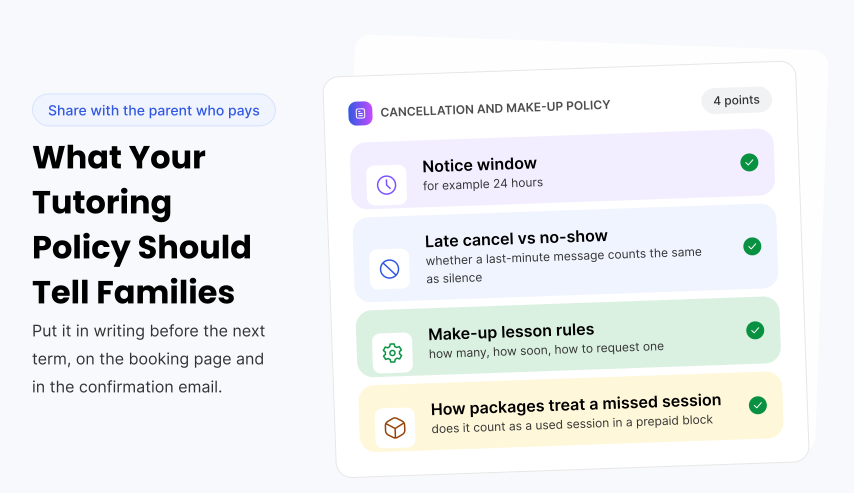
Share the policy with the parent or guardian who pays, not only the student. For wording ideas, see our cancellation policy guide. New tutors can also use the policy section in how to start a tutoring business.
2. Collect contacts for both parent and student
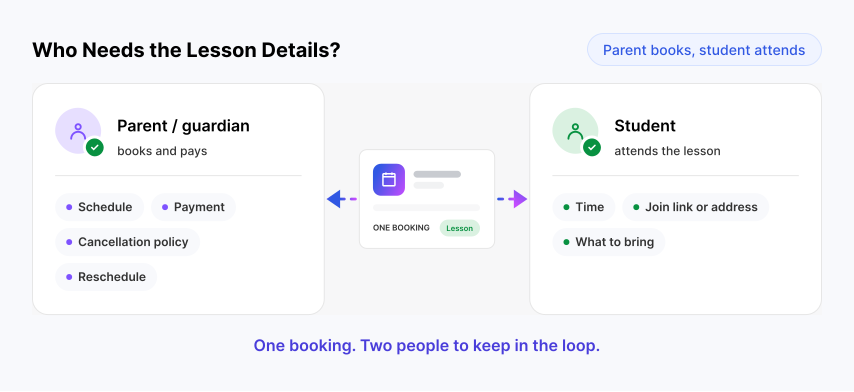
At booking, ask for the parent or guardian email, the student name, and, when appropriate, a student email for online lessons. Note who should receive reminders.
When the student is old enough for online lessons, a second email often prevents “I never got the link” misses.
3. Send email reminders before your cancellation deadline
Time the first reminder so the family can still move the lesson inside your policy. A useful pattern for a 24-hour notice window:
- Confirmation right after booking
- Reminder about 48 hours before
- Short reminder about 1–2 hours before (especially for online join links)
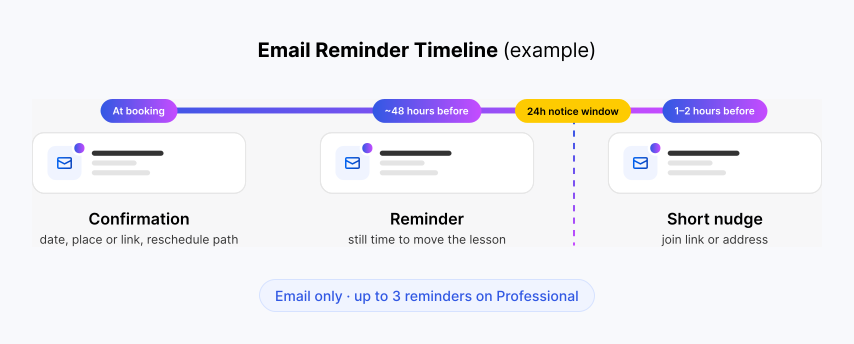
Calfrenzy sends confirmations and reminders by email only (no SMS). On Professional, you can set up to 3 email reminders per booking page with your own timing and a short note.
Keep each reminder short: date, time, time zone, location or video link, what to bring, and how to reschedule. See our appointment reminder templates when that post is live, or automated reminders.
4. Make rescheduling easier than disappearing
Families who can move a lesson quickly are less likely to ghost the slot. Put a clear reschedule path in the confirmation and reminder, with your notice window next to it. For packages, say whether one lesson can move without changing the rest of the term. Calfrenzy supports rescheduling an individual appointment inside a package without changing the remaining appointments.
5. Take payment when the lesson or package is booked
Unpaid lessons are easier to skip. Paid lessons still get missed, but you are not also chasing an invoice for an empty hour.
On Professional, Calfrenzy collects payment at booking through Stripe, and supports packages and recurring bookings. Professional is $7.99/mo billed annually or $9.99 monthly. A 14-day trial needs no card; after that the account moves to Free (1 booking page, 1 calendar, Google Meet, email notifications).
Upfront payment does not replace a cancellation policy. Decide whether a missed prepaid lesson is retained, moved or refunded under your terms. See how to charge for tutoring.
Collect payment when the lesson is booked
Try Calfrenzy Professional free for 14 days: Stripe checkout, packages and recurring lessons, plus email reminders before your deadline. No credit card needed.

6. Prefer a recurring weekly slot over one-off texts
Weekly “are you free Tuesday?” threads create forgotten dates. A recurring series puts every lesson on the calendar so parents can spot holidays, exams and travel before they pay. Recurring lesson scheduling explains how to book a full term as one series. Show every date before checkout. Calfrenzy connects Google, Outlook and iCloud calendars so your availability stays accurate.
7. Put join details and prep notes where families will see them
Many “no-shows” are failed joins or wrong locations.
- Online: include the video link in the confirmation and reminder (Google Meet works on the Free plan).
- In person: address plus parking or entrance notes in the location field
- Prep: one line such as “bring last week’s worksheet” or “test your mic before we start”
What to do after a tutoring no-show
Check the booking details and join link first. Then send a short parent message: you missed them, here is how to rebook, and here is what your policy says. Record attendance separately from payment treatment. For repeat misses, discuss a different time or a smaller commitment before selling another package.
Fee amounts and prepaid-session wording belong in the no-show fee guide.
Frequently asked questions
Be clear early. Put the notice window on the booking page, send useful reminders, and make rescheduling easy.
When a parent books and a student attends, both usually need the information.
No. They change when you collect payment. Keep reminders, visible dates and a written make-up rule in place.
No. Reminders are email only. On Professional you can set up to 3 email reminders per booking page.
Keep more of the lessons you already booked
Tutoring no-shows drop when families see the full schedule, get reminders in time to move a lesson, pay when they book, and know what a miss costs in clear, advance terms.
Calfrenzy’s tutor scheduling software brings booking, Stripe payments on Professional, packages, recurring lessons, calendar sync and email reminders into one flow. Start on Free or try Professional free for 14 days with no credit card.
Related reading:
- How to start a tutoring business
- Recurring lesson scheduling
- How to charge for tutoring
- Add a cancellation policy
- Appointment reminder templates
- No-show fees
- Best tutor scheduling software
Book, remind and get paid in one flow
Calfrenzy brings booking, email reminders, calendar sync, packages and recurring lessons together. Stripe payments are on the Professional plan, $7.99/mo billed annually. Start on Free or try Professional free for 14 days, no credit card.
Get Started FreeRelated Articles

How to Start a Tutoring Business: A Step-by-Step Guide (With Checklist)
Start a tutoring business in 10 steps: pick a niche, handle legal and tax setup, set rates and policies, add booking and payments, and find your first students.

Recurring Lesson Scheduling: How to Book a Full Term at Once
Book a repeating series of lessons — every Tuesday at 4pm for a term — as one series instead of scheduling each lesson individually. How recurring scheduling works, when to use it instead of one-off or multi-session booking, and how to set up a full term without the weekly admin.

How to Charge for Tutoring: Rates, Packages, and Getting Paid Upfront
Learn how to set tutoring rates, price lesson packages, collect payment upfront, and manage invoices, cancellations, and remaining sessions.
Ready to Grow Your Practice?
Set up your booking page in under 2 minutes. Packages, payments, and reminders included.


