


Add Zoom to Every Online Booking
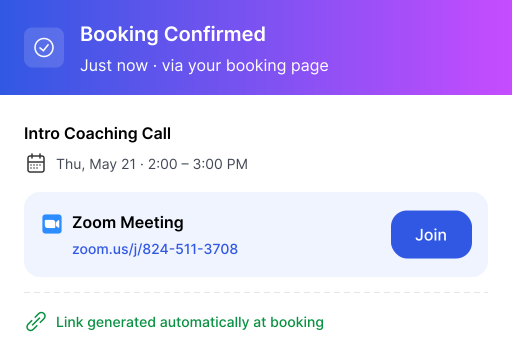
Connect Zoom once, and Calfrenzy automatically creates a meeting link whenever someone books an online session.



Connect Your Zoom Account to Calfrenzy
Connect Zoom once and meeting links are created automatically when clients book online sessions — no copying, pasting, or manual setup.
Manage Multiple
Zoom Accounts
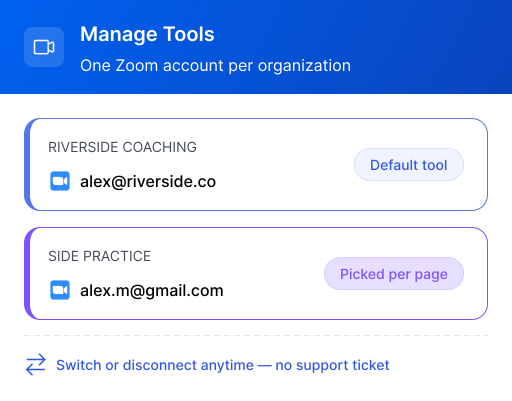
Connect different Zoom accounts for different businesses and keep every booking tied to the right one.
How Calfrenzy Works with Zoom

Automatic Zoom Links
Every online booking gets its own Zoom meeting link automatically.

Works Without a Connected Calendar
Use Zoom for online bookings even if you haven't connected a calendar.

Connect Multiple Zoom Accounts
Manage different Zoom accounts from one Calfrenzy account.

A Unique Link for Every Session
Each session gets its own Zoom link—including sessions within packages and recurring bookings.

Choose Zoom as Your Default
Set Zoom as the default video option for the services or businesses you choose.

Switch or Disconnect Anytime
Change the Zoom account connected to a business whenever you need to.
Watch How to Connect Zoom to Calfrenzy
More Calfrenzy Integrations


Video Conferencing
Zoom, Google Meet, Microsoft Teams, custom meeting links.


Browser & Workspace Integrations
Chrome extension, Gmail add-on, Google Workspace, LinkedIn.