
Charge for Sessions
Get Paid at Booking
Turn bookings into revenue with built-in payment integration.
Clients pay when they book — no follow-ups, no extra tools.

PCI compliant

Instant processing

135+ currencies

Reduce no-shows

Stripe
Apple Pay & Google Pay

PayPal
Coming soon

Square
Coming soon
Supported Payment Processors
Connect your preferred payment processor to start accepting payments immediately.
Stripe
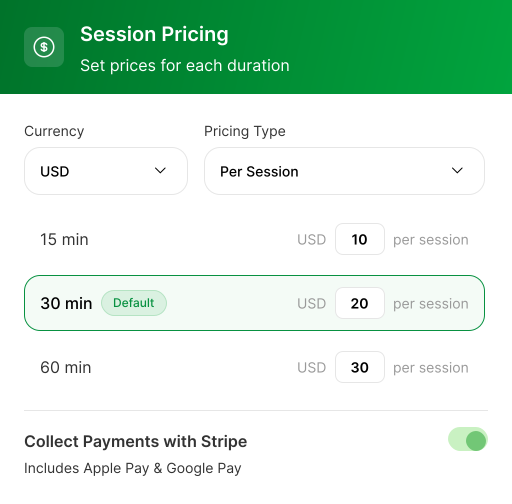
Set prices for each duration
 Credit & debit cards
- Apple Pay & Google Pay
- Bank transfers (ACH)
- Buy now, pay later options

PayPal
Pay with balance or linked accounts
- PayPal balance payments
- PayPal Credit
- Venmo (US only)
- Pay in 4 installments

Square
Use your existing Square account
- Credit & debit cards
- Credit & debit cards
- Afterpay/Clearpay
- Cash App Pay
Collect Payment at the Time of Booking
Clients see their total, pick a payment method, and pay — all before leaving your booking page.

Payment built into the booking flow
Clients select a session, see the price, and pay on your page.

Apple Pay & Google Pay via Stripe
Wallet buttons appear on supported devices. No extra setup.

Pricing visible before checkout
Session prices show on your booking page before clients pick a time.

Cancellation policy at checkout
Your terms appear before the pay button and in confirmation emails.

Flexible Pricing Options
Set up pricing to match how you charge — by session, by person, or by duration.

Per Session Pricing
Fixed rate for each booking based on duration.

Per Person Pricing
When guests are allowed, charge per attendee automatically.

Multiple Durations
15, 30, 60, or 90 min sessions — each at its own price.
Built for Professionals
Who Charge for Time





Frequently Asked Questions
Yes. You can collect payment at the time of booking, so clients pay when they select their session rather than after. You can also choose to display pricing only and handle payment offline. Payment collection runs through Stripe and is available on the Professional and Business tiers.
Clients can pay by credit or debit card through Stripe, including Apple Pay and Google Pay on supported devices. Prices show in the client's local currency at checkout. PayPal and Square integrations are coming soon.
Payments are processed through Stripe, so card details are handled by Stripe's secure infrastructure rather than stored by Calfrenzy. Funds go directly to your own connected account.
No. Calfrenzy doesn't take any cut of your payments — money from bookings goes straight to your own connected account. You'll still pay your payment processor's standard fees (for example, Stripe's per-transaction rate), but Calfrenzy adds nothing on top.
Payment settings are managed by the account owner on a paid plan. On the Business tier, you can manage multiple Professional and Business users across an organization, so teams get the right access.
Ready to Start Accepting Payments?
Connect Stripe, set your prices, and go live in minutes.

14-day free trial • No credit card required


